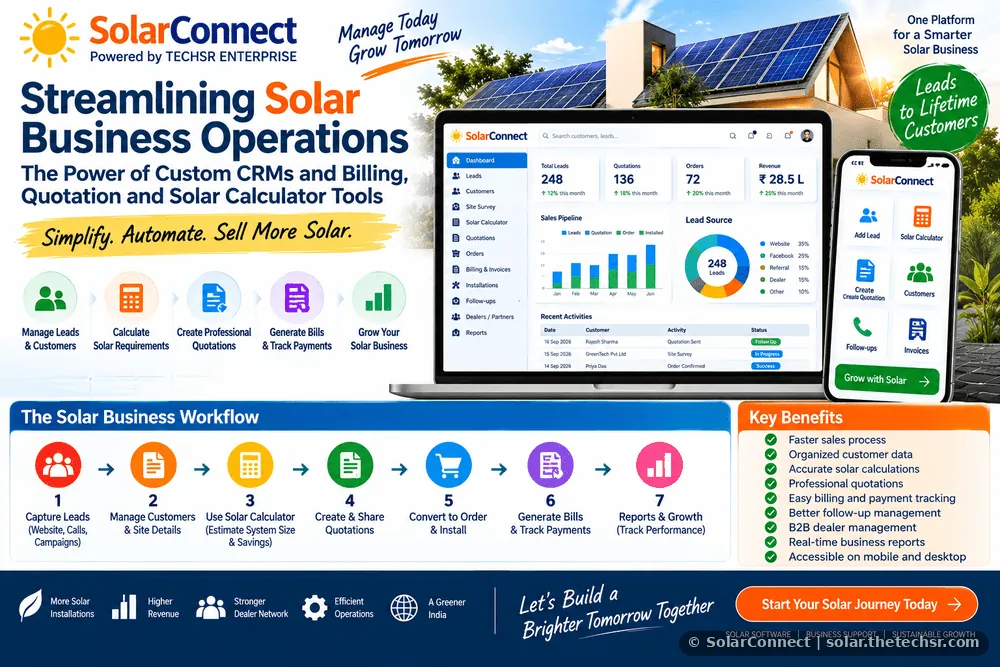
Streamlining Solar Business Operations: The Power of Custom CRMs and Billing, Quotation and Solar Calculator Tools
Learn how solar businesses can use custom CRM, billing, quotation and solar calculator tools to manage leads, customers, sales, pricing and daily operations more efficiently.
Streamlining Solar Business Operations: The Power of Custom CRMs and Billing, Quotation and Solar Calculator Tools
The solar industry is growing rapidly, but managing a solar business efficiently requires more than simply selling solar panels and installation services. Dealers, distributors, EPC companies, sales teams and solar entrepreneurs need to manage leads, customer information, site requirements, system capacity, quotations, pricing, follow-ups, payments and project status in an organized way.
When these activities are managed through notebooks, spreadsheets, WhatsApp messages and separate software applications, important information can easily become difficult to track. Sales teams may miss follow-ups, quotations may be prepared with inconsistent pricing, and customer information can become scattered across different platforms.
A customized solar business management system can bring these activities together in one workflow. A combination of CRM, billing, quotation, solar calculator and sales management tools can help businesses reduce repetitive work, improve accuracy and create a more structured sales process.
Why Solar Businesses Need Better Operations Management
A typical solar sales process involves several stages. A business may receive a lead through a website, social media, referral, dealer network or marketing campaign. The sales representative then contacts the customer, collects electricity and property information, estimates the required solar capacity, prepares a quotation, follows up with the customer and eventually coordinates installation and payment.
Without a centralized system, each stage can become dependent on manual data entry and individual employees.
- Customer information may be stored in different places.
- Sales representatives may forget follow-up dates.
- Quotation prices may be calculated manually.
- System capacity calculations may take unnecessary time.
- Billing information may not be connected with customer records.
- Management may have limited visibility into sales performance.
- Dealer and B2B customer information can become difficult to organize.
A customized CRM and solar business toolkit addresses these operational problems by connecting the different activities into a single workflow.
What Is a Custom Solar CRM?
A custom solar CRM is a customer relationship management system designed specifically for the requirements of solar businesses.
Instead of using a generic CRM with unnecessary features, a solar-focused CRM can be designed around the actual sales process of a solar dealer, EPC company, distributor or channel partner.
The system can maintain information about:
- B2C residential customers
- B2B dealers and business customers
- Solar leads
- Sales representatives
- Customer requirements
- Site and electricity information
- System capacity
- Quotations
- Follow-ups
- Payments and billing
- Installation status
- Dealer onboarding
- Sales activities
The main objective is simple: keep the right information available to the right person at the right stage of the sales process.
How to Apply a CRM in a Solar Business
Implementing a CRM does not have to be complicated. The best approach is to start with the existing business process and convert each important activity into a structured step.
Step 1: Collect and Organize Leads
Every new lead should be entered into the CRM with essential information such as customer name, mobile number, location, electricity consumption, lead source and assigned salesperson.
Lead sources can include:
- Website enquiries
- Facebook and social media campaigns
- Google advertising
- Dealer references
- Existing customer referrals
- Telecalling campaigns
- Offline enquiries
- Business-to-business enquiries
A centralized lead database allows the business to understand where enquiries are coming from and which leads require immediate attention.
Step 2: Assign Leads to Sales Users
Once a lead enters the system, an administrator or manager can assign it to a salesperson or relationship manager.
The salesperson should be able to view the leads assigned to them, contact customers, record call feedback and schedule the next follow-up.
This creates accountability without requiring management to manually ask every salesperson for updates.
Step 3: Record Customer Requirements
The salesperson can use a structured customer form to collect important information before preparing a proposal.
- Customer name
- Mobile number
- Location
- Electricity bill information
- Average monthly electricity consumption
- Available rooftop area
- Preferred solar system type
- Existing electrical connection
- Customer budget
- Installation requirements
Keeping this information in the CRM makes future communication easier and reduces repeated data collection.
Solar Calculator: Turning Customer Data into a Practical Proposal
A solar calculator can become one of the most useful tools in a solar sales workflow.
Instead of manually performing calculations for every customer, a calculator can use selected inputs to estimate the proposed system size, expected generation, approximate project value and other relevant parameters.
Depending on the business model, a solar calculator may include inputs such as:
- Monthly electricity consumption
- Average electricity bill
- Available rooftop area
- Solar system capacity
- Panel wattage
- Number of panels
- Estimated generation
- Project cost
- Applicable taxes
- Subsidy or financial-support inputs where applicable
The calculation logic should be based on the business's approved technical and commercial assumptions. Estimated generation and savings should be clearly presented as estimates rather than guaranteed results.
Why a Solar Calculator Helps Sales Teams
A calculator can reduce repetitive calculations and make customer discussions easier.
For example, when a customer asks, "How much solar capacity do I need?", the salesperson can enter the relevant information and quickly generate an indicative calculation.
This allows the salesperson to spend more time understanding the customer's requirement instead of repeatedly performing manual calculations.
Quotation Tool: From Calculation to Professional Proposal
After estimating the appropriate system configuration, the next important step is preparing a professional quotation.
A quotation tool can connect customer information with product and pricing information so that the salesperson does not need to prepare every quotation from scratch.
A professional solar quotation may include:
- Customer information
- Quotation number
- Quotation date
- Solar system capacity
- Panel details
- Inverter details
- Mounting structure
- DC and AC protection equipment
- Cables and accessories
- Installation and commissioning
- Applicable taxes
- Optional items
- Payment terms
- Warranty information
- Quotation validity
The quotation should clearly distinguish between included and optional items. This helps reduce confusion during the sales process.
Connect the Solar Calculator with the Quotation
One of the biggest advantages of an integrated solar sales system is connecting the calculator directly with the quotation module.
A practical workflow can look like this:
Lead → Customer Details → Solar Calculation → System Configuration → Pricing → Quotation → Follow-up → Order → Billing
Once the customer information and system requirements have been entered, the quotation module can use those details to prepare a proposal.
This reduces duplicate data entry and helps maintain consistency between the calculation and commercial proposal.
Billing and Invoice Management
After a customer accepts a quotation, the business needs to manage billing and payment information.
A solar billing module can maintain a connection between the customer, quotation and final invoice.
Important billing information may include:
- Invoice number
- Customer details
- Billing address
- GST information where applicable
- Product and service description
- Quantity
- Unit price
- Tax calculation
- Discount
- Total amount
- Payment status
- Balance amount
For businesses handling GST invoices, the billing workflow should follow applicable tax and invoicing requirements. Tax rates and regulatory requirements should always be verified before implementation.
Quotation to Billing: Maintain One Customer Record
A strong system should avoid creating completely separate customer records for every activity.
Ideally, one customer profile should connect the complete commercial journey.
| Stage | Information | Business Benefit |
|---|---|---|
| Lead | Source, contact and requirement | Better lead management |
| Customer | Personal and project information | Centralized customer record |
| Calculation | Capacity and estimated generation | Faster technical discussion |
| Quotation | Products, services and pricing | Professional proposal |
| Billing | Invoice and payment information | Better financial tracking |
| Follow-up | Calls, notes and next action | Reduced missed opportunities |
Follow-Up Management Is Critical for Solar Sales
Many solar enquiries do not convert after the first conversation. Customers may need time to compare quotations, discuss financing, speak with family members or understand the installation process.
For this reason, follow-up management should be an important part of the CRM.
A CRM can allow sales users to record:
- Call date
- Customer response
- Interested or not interested status
- Objection or concern
- Next follow-up date
- Salesperson notes
- Quotation status
A dashboard can then show pending follow-ups so salespeople can prioritize their daily activities.
WhatsApp and Communication Workflow
Solar sales frequently involve quotation sharing, document collection, appointment confirmation and customer updates.
Where appropriate and legally permitted, communication tools can be integrated into the CRM to make these activities easier.
For example, a salesperson may be able to open a customer's communication channel directly from the CRM and share the approved quotation or follow-up message.
Businesses should follow applicable consent, privacy and messaging-platform requirements when sending marketing or commercial communications.
B2B Solar Dealer Management
Solar businesses operating through dealers, distributors or channel partners need a different type of CRM workflow.
A B2B module can maintain dealer information such as:
- Dealer name
- Business name
- Contact information
- Business location
- GST information
- Dealer category
- Assigned relationship manager
- Sales history
- Pending documents
- Quotation history
- Order status
- Payment information
This can help management maintain a structured dealer network rather than relying entirely on spreadsheets and messaging applications.
Admin and Sales User Permissions
A professional CRM should not give every user unrestricted access to business information.
Role-based permissions can help protect customer and commercial data.
Administrator
- Manage users
- View overall sales activity
- Assign leads
- Manage products and pricing
- Review quotations
- View customer records
- Monitor follow-ups
- Export business data
- Review sales performance
Sales User
- View assigned leads
- Add customer information
- Record calls
- Schedule follow-ups
- Use the solar calculator
- Create quotations according to permissions
- Update sales status
The exact permission structure should be customized according to the organization's internal responsibilities.
How to Implement These Tools in a Solar Company
Businesses should avoid trying to digitize every process at once. A phased implementation can be easier to manage.
Phase 1: Build the Customer Database
Start with leads, customers, dealers, sales users and basic contact information.
Phase 2: Add Lead and Follow-Up Management
Introduce lead assignment, call records, follow-up dates and sales status.
Phase 3: Add Solar Calculator
Configure the calculator using the company's approved technical assumptions, product specifications and calculation methodology.
Phase 4: Add Quotation Management
Connect products, system configurations, pricing and customer information to a professional quotation format.
Phase 5: Add Billing
Connect accepted quotations with invoices and payment tracking while following applicable accounting and tax requirements.
Phase 6: Add Reporting
Management can then introduce dashboards and reports for leads, conversions, pending follow-ups, quotations, orders and sales activity.
What Information Should Be Ready Before Building a Custom CRM?
Before developing a custom system, the business should document its existing sales and operational process.
The following information is particularly useful:
- Lead sources
- Customer fields
- Dealer information
- Product catalogue
- Panel specifications
- Inverter specifications
- System packages
- Pricing structure
- Tax configuration
- Quotation format
- Invoice format
- Payment terms
- Sales stages
- User roles
- Approval requirements
- Reports required by management
Preparing these details before development can reduce changes later and make the final system more closely aligned with the company's actual workflow.
Common Mistakes to Avoid
Using Too Many Separate Tools
If lead management, calculation, quotation and billing are completely disconnected, employees may need to enter the same information multiple times.
Making the CRM Too Complicated
A CRM should be easy enough for sales users to operate during a busy working day. Unnecessary fields and complicated workflows can reduce adoption.
Ignoring Mobile Users
Solar sales teams frequently work outside the office. A mobile-friendly CRM allows salespeople to update leads, make calls, check customer information and create proposals while visiting customers.
Not Controlling Pricing
When multiple salespeople manually enter prices, inconsistent quotations can become a problem. Product and pricing controls can help reduce accidental errors.
Not Backing Up Business Data
Customer, quotation and billing data are valuable business assets. A suitable backup and data-recovery strategy should be included in the system design.
Mobile-First Solar CRM: Why It Matters
A solar CRM should not be designed only for an office computer.
Sales representatives may use smartphones while visiting homes, shops, factories, dealers and project sites. Therefore, important actions should remain simple on a mobile screen.
- Quick lead entry
- One-tap customer calling
- Simple follow-up updates
- Mobile solar calculator
- Quotation generation
- Customer search
- Dealer search
- Document status
- Sales dashboard
The objective is to make the CRM useful in the field, not just in the office.
How SolarConnect Can Support a Structured Solar Sales Workflow
SolarConnect powered by TECHSR ENTERPRISE is designed around the practical requirements of solar sales and dealership operations.
A solar-focused platform can bring together customer management, B2B dealer management, sales activities, follow-ups and solar business tools into a connected workflow.
The concept is to make the journey simpler:
Find Lead → Contact Customer → Understand Requirement → Calculate Solar Requirement → Prepare Quotation → Follow Up → Confirm Order → Generate Bill → Track Business
Instead of treating each activity as a separate process, a connected workflow can provide a clearer view of the customer journey.
Benefits of a Connected Solar Business Management System
- Faster sales operations: Reduce repetitive data entry and manual calculations.
- Better lead management: Organize new enquiries and follow-ups systematically.
- Professional quotations: Generate consistent proposals using structured information.
- Improved calculation workflow: Use a dedicated solar calculator for indicative system planning.
- Centralized customer data: Keep customer information available in one place.
- Better management visibility: Track sales activities and business status through reports.
- Dealer network management: Organize B2B customers and channel partners.
- Mobile accessibility: Support sales teams working in the field.
- Reduced operational errors: Standardize important business processes.
Final Checklist Before Selecting or Developing a Solar CRM
- Is the CRM mobile friendly?
- Can it manage both B2C and B2B customers?
- Can salespeople record calls and follow-ups?
- Does it include a solar calculator?
- Can the calculator connect with quotations?
- Can quotations be generated as professional documents?
- Can accepted quotations move into billing?
- Can management monitor sales activity?
- Are user permissions available?
- Can business data be exported and backed up?
- Can the system be customized as the business grows?
Conclusion
The future of solar sales is not only about better products. Efficient business operations are equally important.
A properly designed custom CRM, solar calculator, quotation system and billing workflow can help solar businesses organize their sales process from the first enquiry through customer conversion and billing.
The most useful system is not necessarily the one with the largest number of features. It is the system that matches the company's actual workflow and is simple enough for employees to use consistently.
For solar dealers, EPC companies, distributors, channel partners and growing solar businesses, connecting leads, customers, calculations, quotations, follow-ups and billing can create a more structured foundation for sustainable business growth.
SolarConnect powered by TECHSR ENTERPRISE focuses on bringing practical solar sales and business-management tools into one connected workflow.
Build a smarter solar sales process. Manage customers better. Calculate faster. Quote professionally. Follow up systematically.
Source: SolarConnect India – solar.thetechsr.com
Back to Solar Blog